# Set Custom IC Mobile Msg Template

Associate InformaCast Advanced Messages with InformaCast Mobile Message Templates. ***When the listed Message is sent from InformaCast Advanced, the appropriate Message Template in InformaCast Mobile will be triggered***.

##### **To Associate IC Mobile Template with IC Advanced Message**

- Login to InformaCast Advanced
- Select **Endpoints** from the left menu
- Select the **InformaCast Mobile** box
- Expand the **Set Custom InformaCast Mobile Message Templates** section
- Select the **InformaCast Advanced Message** to associate with an **InformaCast Mobile Message Template**
- Select the InformaCast Mobile Message Template from the **Message Template** dropdown
- Note: You may need to type a few characters of the message name for it to appear in the dropdown.
- Click on the <span style="background-color: #33cccc;">**SAVE**</span> button to save the association

<p class="callout danger">Warning: For an InformaCast Advanced Recipient Group to get passed to an InformaCast Mobile Message Template, the Distribution List on the InformaCast Mobile Message Template cannot be locked.</p>

##### **To Verify/Unlock an IC Mobile Message Template Distribution List**

- Login to InformaCast Mobile
- Select **Message Templates** from the Quick Links menu or under Notifications from the main menu
- Select the Message Template from the list
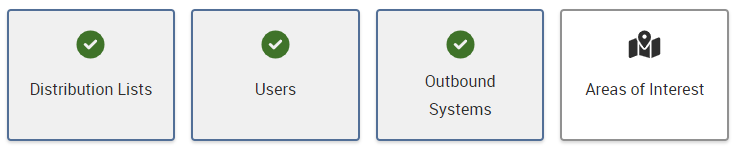
- Scroll down to the **Recipient** section
- Distribution Lists must be enabled (green check)
- [![image-1667397882580.png](https://ccskb.calschools.org/uploads/images/gallery/2022-11/scaled-1680-/image-1667397882580.png)](https://ccskb.calschools.org/uploads/images/gallery/2022-11/image-1667397882580.png)
- The Distribution Lists dropdown must be **unlocked**
- [![image-1667397990754.png](https://ccskb.calschools.org/uploads/images/gallery/2022-11/scaled-1680-/image-1667397990754.png)](https://ccskb.calschools.org/uploads/images/gallery/2022-11/image-1667397990754.png)

- If changes were made click on the **Save Template** button in the lower right

<p class="callout info">The Message Template will now accept Recipient Groups from Informacast Advanced messages</p>